Real2SimLab

A Unified Platform for Real-to-Simulation Transfer

  • Unified platform47 coding agents, your own pipelines and hand-written programs, on six benchmarks.
  • Fair comparisonThe same sandbox for every method, a frozen program, and an offline re-run without the hidden data.
  • One commandr2s run example.toml gives one scorecard.
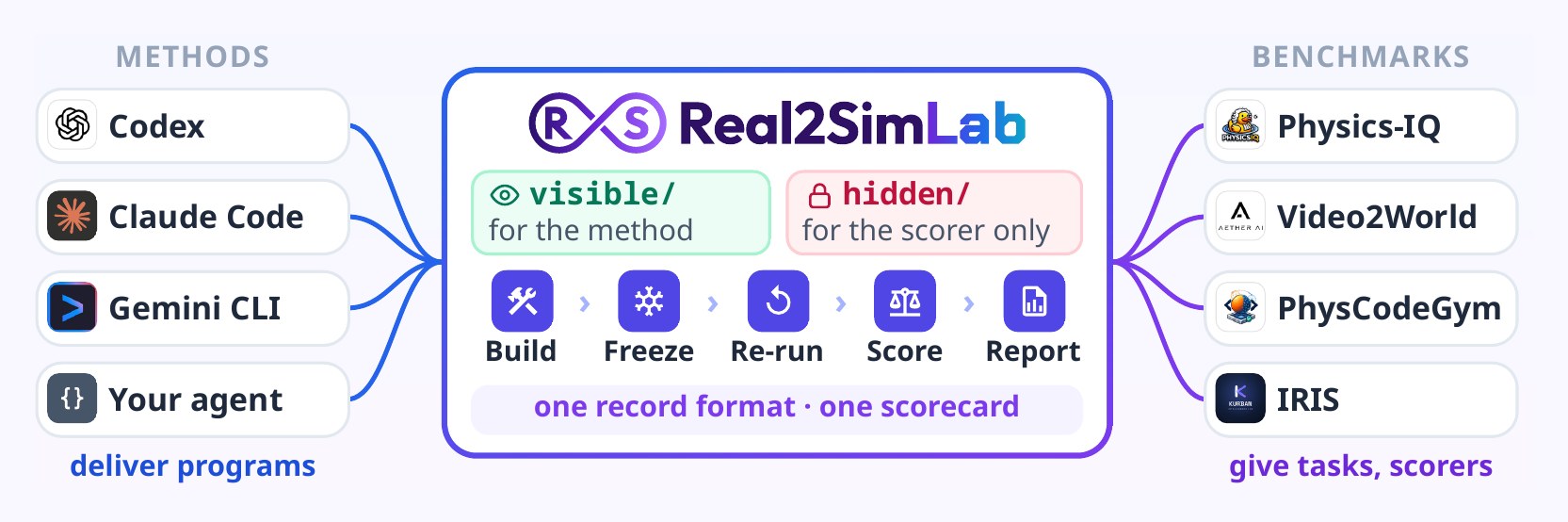
Real2SimLab in the middle, with visible data for the method and hidden data for the scorer only, and five steps: build, freeze, re-run, score, report, giving one record format and one scorecard. On the left, methods (Codex, Claude Code, Gemini CLI, your pipeline) deliver programs; on the right, benchmarks (Physics-IQ, Video2World, PhysCodeGym, IRIS) give tasks and scorers. Each connects once.
  • ⋆Equal contribution
  • †Co-project leaders
  • ✉Corresponding author
  • 1State Key Laboratory of General AI, School of Intelligence Science and Technology, Peking University
  • 2Ngoro Robotics
  • 3School of Physics, Peking University
  • 4The University of Hong Kong

Why a shared platform

Benchmarks differ in their inputs, deliverables and scorers, so N methods on M benchmarks take N × M integrations. With Real2SimLab, each connects once: N + M.
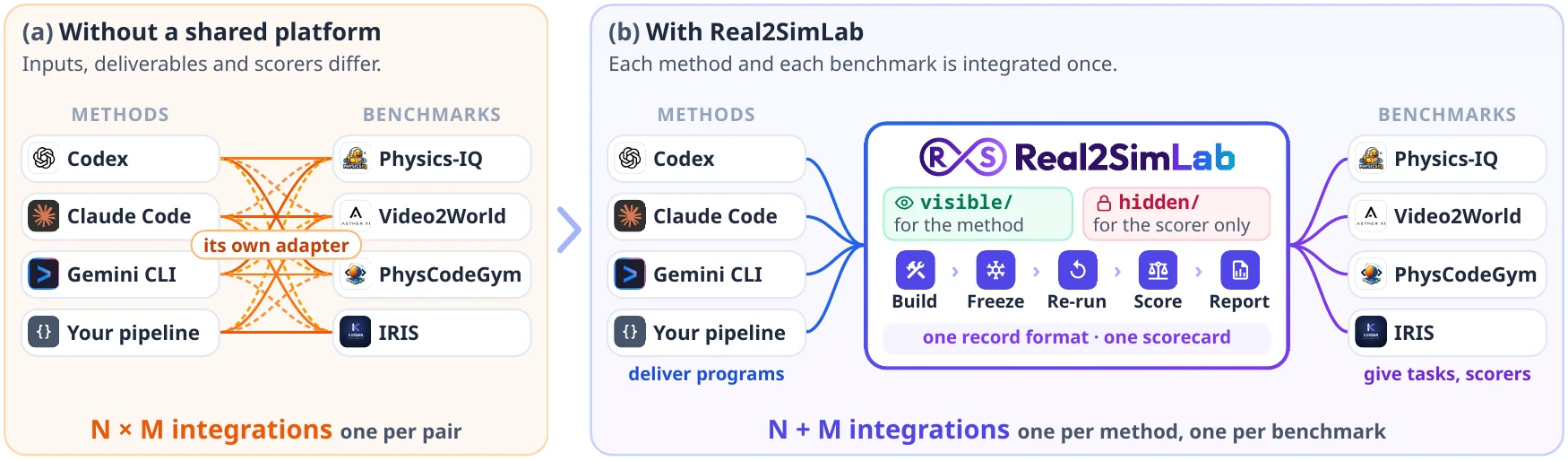
Left, without a shared platform: four methods (Codex, Claude Code, Gemini CLI, your pipeline) and four benchmarks (Physics-IQ, Video2World, PhysCodeGym, IRIS) joined by a tangle of wires, each pair with its own adapter: N times M integrations. Right, with Real2SimLab: each method and each benchmark connects once to Real2SimLab, which keeps visible data for the method and hidden data for the scorer, and builds, freezes, re-runs, scores and reports: N plus M integrations.

Scroll sideways to see the whole figure.

Without a shared platform (left) and with Real2SimLab (right).

A fair comparison, in five steps

  1. BuildA method writes its program in a sandbox.
  2. FreezeThe program is copied and fingerprinted.
  3. Re-runIt runs again offline, without the hidden data.
  4. ScoreThe benchmark's own scorer, or the reproduction skill for raw datasets.
  5. ReportOne scorecard for every benchmark.

A failure of the machine is redone, never counted as a score.
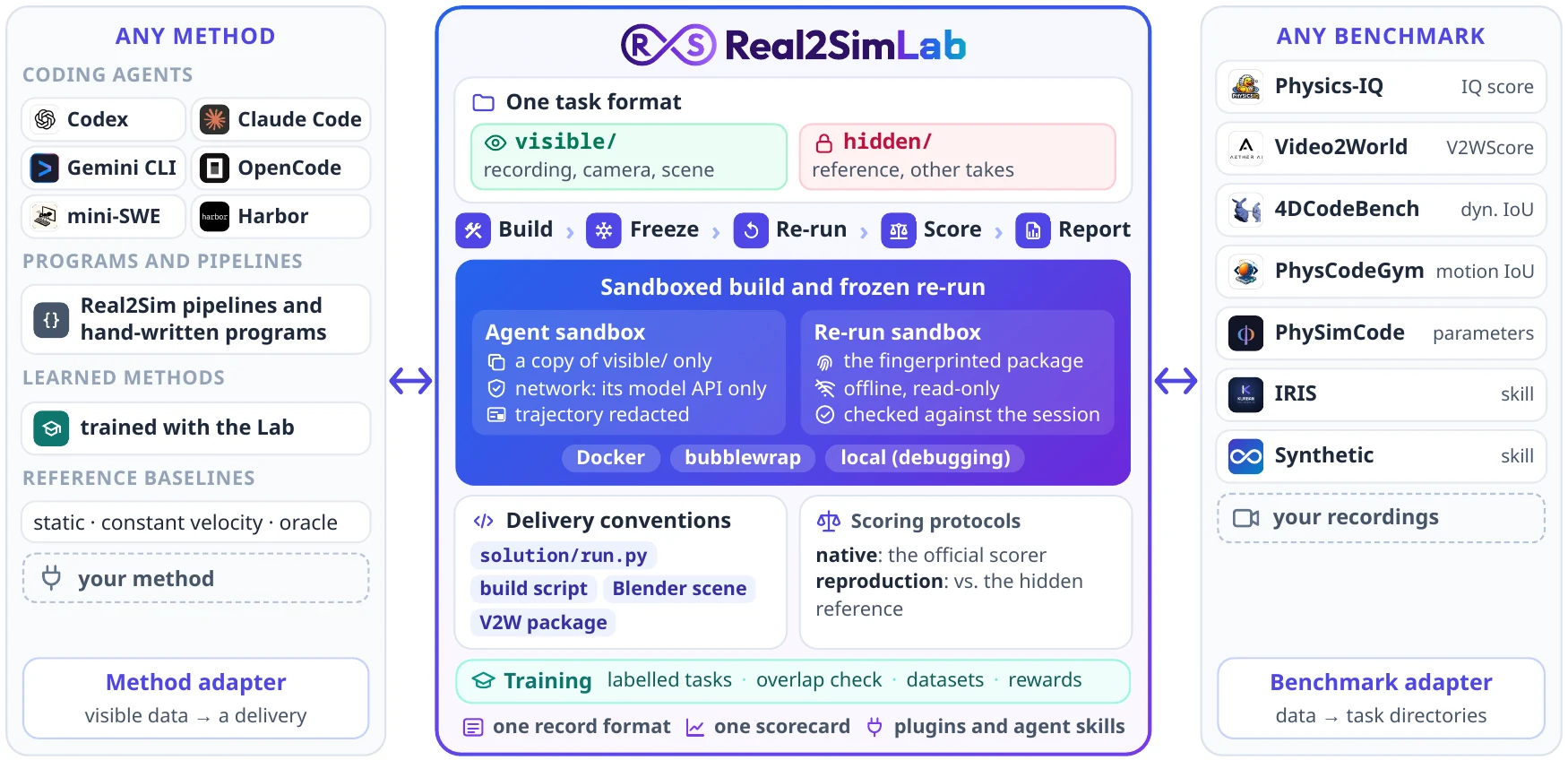
Architecture of Real2SimLab. Left: any method, such as coding agents, real-to-simulation pipelines, hand-written programs, learned methods and reference baselines, through a method adapter. Right: any benchmark, Physics-IQ, Video2World, 4DCodeBench, PhysCodeGym, PhySimCode, IRIS, Synthetic and your recordings, through a benchmark adapter. Center: one task format with visible and hidden parts; build, freeze, re-run, score and report; sandboxed build and frozen re-run; delivery conventions; scoring protocols; training; one record format and one scorecard.

Scroll sideways to see the whole figure.

Methods (left) and benchmarks (right) connect through adapters.

Recordings and re-runs

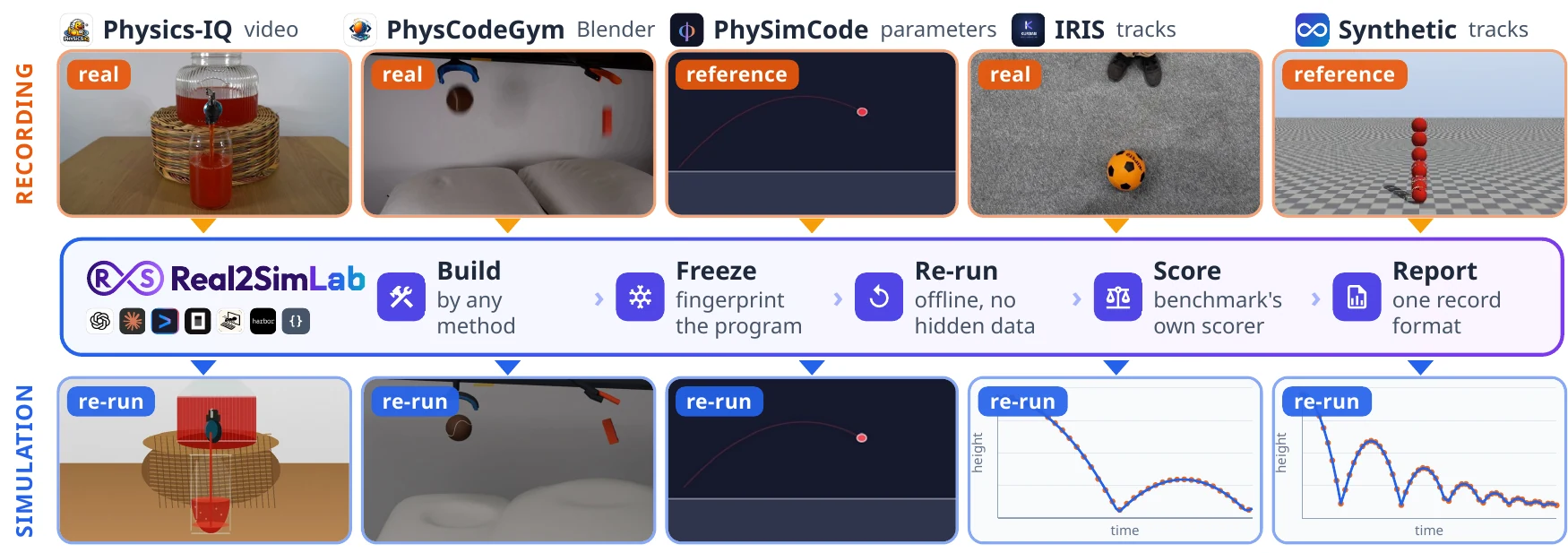
Five benchmarks, Physics-IQ, PhysCodeGym, PhySimCode, IRIS and Synthetic. Top row: the recording a method sees, real for Physics-IQ, PhysCodeGym and IRIS, a reference for PhySimCode and Synthetic. Middle: Real2SimLab builds, freezes, re-runs, scores and reports. Bottom row: the re-run of each program, as frames or as height-over-time plots of the tracked ball.
Top: what a method sees (for PhySimCode and Synthetic, a simulated reference). Bottom: the re-run of a program written by Codex.

Six benchmarks, many coding agents

Each benchmark keeps its own tasks and scorer. Every method, from coding agents to your own pipeline, runs on all of them in the same way.
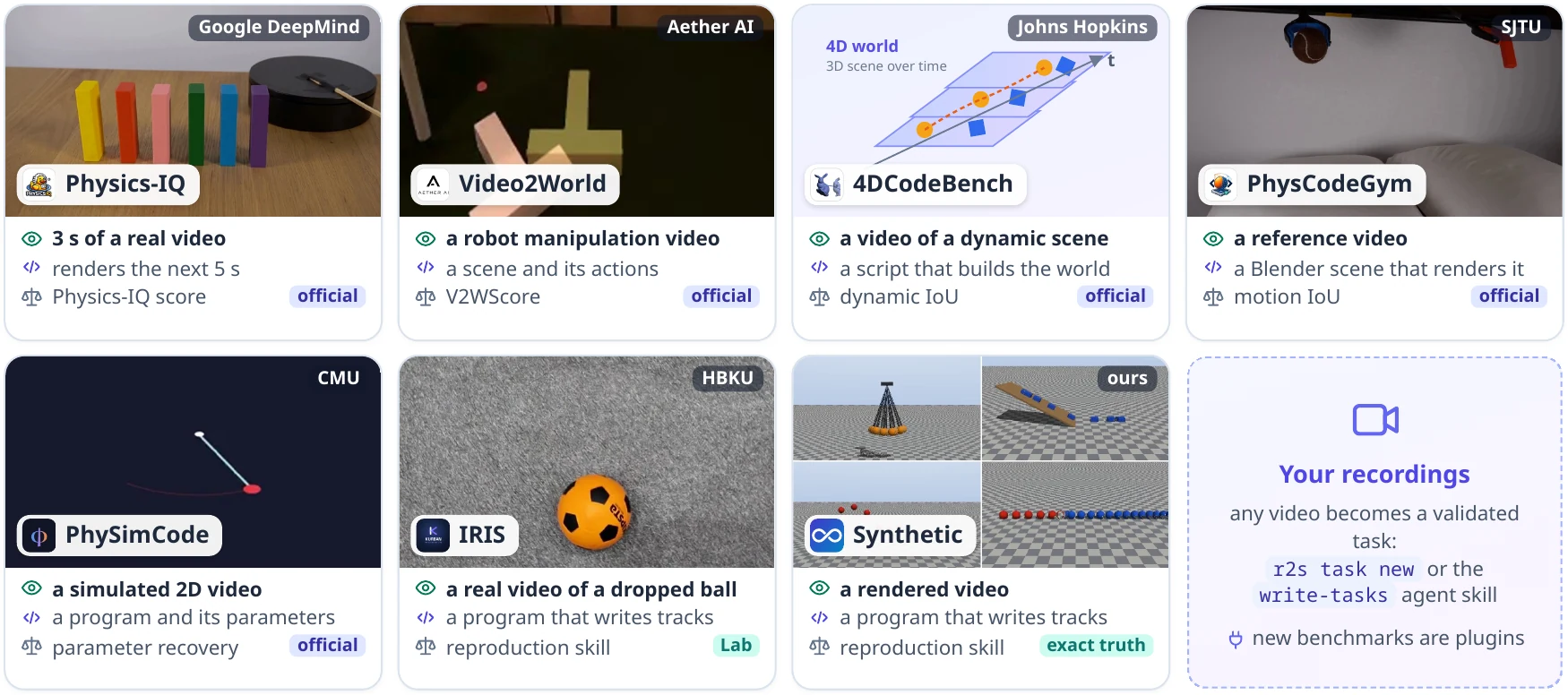
Cards for the six benchmarks and our synthetic suite, each with what a method sees, what it delivers and how it is scored: Physics-IQ, Video2World, 4DCodeBench (shown as a drawing), PhysCodeGym, PhySimCode, IRIS and Synthetic, and a card for your own recordings.

Scroll sideways to see the whole figure.

4DCodeBench declares no license, so its card shows a drawing.

Training data from the same tasks

Real2SimLab provides training tasks, datasets that leave out every recording of an evaluation task, and rewards computed by the evaluation's own code. It ships no trainer and no weights.
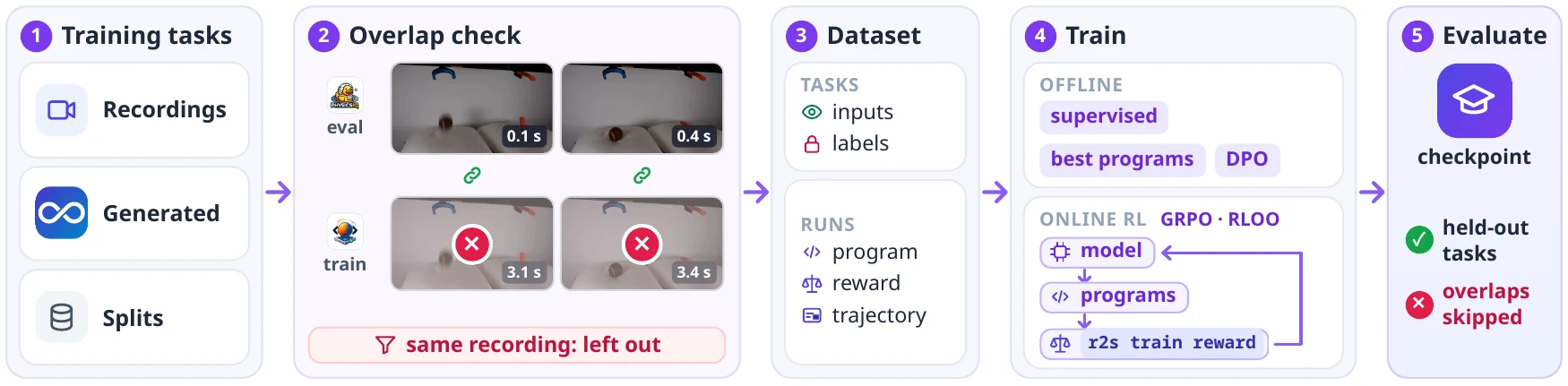
Five stages: training tasks from recordings, generated scenes or splits; an overlap check that compares frames and leaves out a training clip showing the same recording as an evaluation task; a dataset of tasks and runs; training by a user's own method, offline or online with the reward; and evaluation of the checkpoint on held-out tasks only.

Scroll sideways to see the whole figure.

An overlap check keeps evaluation recordings out of training.

Get started

git clone https://github.com/Real2SimHub/Real2SimLab.git && cd Real2SimLab
pip install -e .        # Python 3.11+ and ffmpeg
r2s demo --open         # about 30 s on a CPU

Next: Real2SimLab on GitHub.

BibTeX

If you use either project, please cite our paper:

@article{real2simlab2026,
  title   = {Real2SimLab: A Unified Platform for Real-to-Simulation Transfer},
  author  = {Zhang, Yongchang and Huang, Jie and Ni, Yunhe and Zhou, Ningyu and Zhao, Guangyu and Liu, Ruixun and Huang, Rui and Wu, Yidi and Zhang, TianZe and Jiang, Zixiang and Li, Xiang and Shen, Kevin and Zhong, Yiwu},
  journal = {arXiv preprint arXiv:2611.34849},
  year    = {2026}
}